Introducing Mastery - in-product EOS training built right into Success.co. Two courses covering the 5 Foundational Tools and the full EOS Toolbox, designed for your entire team to learn at their own pace. Progress tracking, auto-advance, suggested lessons, and reporting so managers and implementers can see exactly who's levelling up.
We've just released Mastery, our in-product training system that helps every person in your organisation learn and master the key lessons of EOS - at their own pace, in their own time, right inside Success.co.
It's designed to make learning EOS genuinely engaging. Not a chore. Not a box-ticking exercise. Something people actually want to open and work through.
Why we built this
We think about this a lot: what does it actually take for a company to thrive on EOS?
It's not just having the right software. It's not just having a great implementer. It's the people. Every single person in the organisation needs to understand the tools they're using and why they matter. When the whole team gets it - really gets it - everything clicks. Meetings get sharper. Rocks get done. Issues get solved properly. Accountability becomes natural instead of forced.
The problem is that most teams learn EOS in a session room, absorb a huge amount of information in a short time, and then slowly forget the details as the weeks go by. The implementer leaves, the day-to-day takes over, and the nuance fades. People remember the basics but lose the depth.
We wanted to fix that.
The key lessons of EOS need to be mastered by every member of the team. Every employee needs to know the 5 foundational tools. Every member of the leadership team needs to deeply understand the full EOS toolbox. And ideally, that learning happens close to where you work every day - not in a separate app, not in a PDF buried in a shared drive, not in a video you bookmarked six months ago and never watched.
If it's more than a click or two away, people just won't engage. That's the reality. So we built Mastery right into Success.co, accessible from your sidebar, sitting alongside the tools you're already using every day. You finish your Level 10, you open Mastery, you spend ten minutes levelling up. That's the behaviour we're designing for.
Designed with implementers, built for teams
We didn't build this in isolation. We talked to multiple implementers early on and showed them the prototype. The feedback was immediate and specific.
They loved the general design but told us something important: we should separate the 5 Foundational Tools from the full EOS Toolbox. The reasoning was clear. The 5 foundational tools are for everyone in the company - every employee, every team member, regardless of role. The full toolbox is deeper, more detailed, and primarily for the leadership team. But - and this was a key insight - the toolbox shouldn't be locked away. If someone on the team wants to learn more, wants to show they're ready to step up, they should be able to access it.
So we made the change. Two courses, clear purpose for each, but no gatekeeping on knowledge.
We were also asked to provide visibility on who has engaged - managers and implementers need to see who's progressing and who might need a nudge. And team members wanted the ability to share that they'd completed a course. There's real pride in mastering something, and we wanted to make that shareable.
Beyond the structural decisions, we obsessed over making the experience itself engaging. A few of the design choices we're most proud of:
- Suggested next lesson - when you log in, Mastery recommends what to learn next based on your progress and what your team needs most.
- Auto-advance - when you master a lesson, you're automatically moved to the next unfinished lesson in the course. No friction, no hunting for where you left off. The momentum just carries you forward.
- Progress tracking everywhere - progress bars, completion counts, and team mastery dots are visible at every level so you always know where you stand.
- Confetti - yes, the confetti was essential. When you complete a course, you deserve a moment. It's a small thing but it makes people smile, and that matters.
Overall we're proud of what we're delivering here. An intuitive, engaging design that makes learning fun and keeps people coming back.
Where to find it
You'll find Mastery in the sidebar within Success.co. One click and you're in.
Mastery walkthrough
The home screen
When you open Mastery, you land on the home screen which shows your overall learning progress - a ring chart showing how far you've come, how many lessons you've mastered, how many are in progress, and a prominent "Continue learning" button to pick up right where you left off.
Below that, you'll see the two courses laid out with progress bars and completion counts for each. At a glance, you know exactly where you stand.
If the system spots a lesson your team would benefit from, it surfaces a suggested next lesson banner with context on why it matters - for example, "Your team uses IDS in every Level 10 - mastering this lesson will strengthen meeting outcomes."

Course 1 - The 5 Foundational Tools
The first course is intended for your entire team - every person in your company who is running with EOS. These are the tools that everyone needs to understand to participate effectively in the system: the core concepts that make everything else work.
The lessons are short, focused, and designed to be completed in a few minutes each. Every lesson has clear content, a progress bar showing where you are, and a status indicator so you can see at a glance what's done and what's left.

Course 2 - The EOS Toolbox
The second course goes deeper. It's designed for the leadership team and covers the complete EOS toolbox - from the Accountability Chart and V/TO to Delegate and Elevate, the People Analyzer, LMA, Clarity Break, and beyond.
However, we made a deliberate decision: there's no reason to block other team members from accessing this content. If someone on your team wants to go beyond the fundamentals, wants to understand how the whole system fits together, wants to show they're ready to take on more responsibility - they should be able to. So the toolbox is available to everyone. Leadership-focused, but open to all.
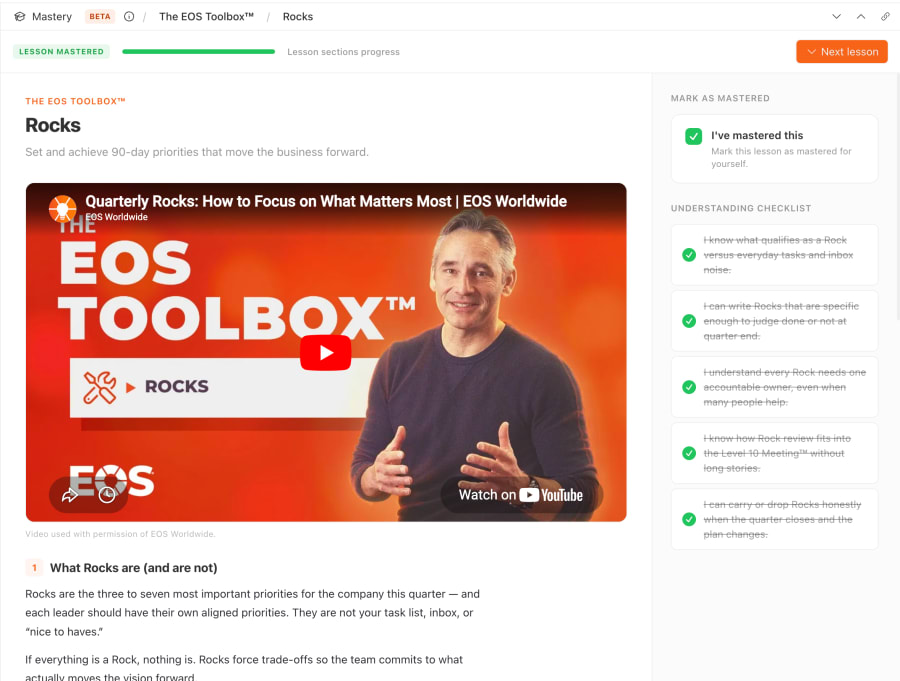
Each lesson includes video, text, and images explaining the concept. There's an optional understanding checklist so you can self-assess, and mastery checkboxes for both individual and team-wide completion. Managers can mark a lesson as mastered for the entire team when they're confident the group has it down.
Auto-advance to the next lesson
Small detail, big impact. When you mark a lesson as mastered, you're automatically advanced to the next lesson in the course that you haven't completed yet. No clicking back to a menu, no scanning a list to figure out what's next. You just keep going.
This was a deliberate design choice to reduce friction and maintain learning momentum. The best learning experiences feel effortless to navigate, and auto-advance is a big part of that.

Course completion and sharing
When you complete a course, you get your moment (yes, with confetti). But beyond the celebration, you can share your completion - with your team, your manager, or on social media. We built this because mastering EOS is an achievement worth recognising. It signals commitment, competence, and readiness.
For implementers, seeing a client's team share their Mastery completions is a powerful signal that the system is taking hold.

Reporting and progress tracking
Managers and implementers can see exactly where the team stands. The Mastery dashboard shows high-level stats - overall mastery percentage, lessons mastered versus in progress versus not started - and an individual member progress table that makes it clear who's engaged and who might need a nudge.
There's also a lesson-level drill-down showing which specific lessons each team member has mastered, so you can have targeted conversations rather than generic reminders.

Time for Mastery
This is live in the product now. Open Success.co, find Mastery in the sidebar, and give it a go. We'd love to hear your feedback.
A huge thank you to our partners at EOS Worldwide who gave us permission to share their content and their blessing on the overall format. This collaboration means the lessons inside Mastery are grounded in the real EOS methodology, not our interpretation of it.
Thank you to Karl Pisor, an implementer based in Tokyo, who gave us the feedback to split out the 5 Foundational Tools as a separate course. That single piece of advice fundamentally improved the structure and made Mastery work for entire organisations, not just leadership teams.
And thank you to freshly minted implementer Chris Beer, who pushed us to allow users to share that they'd completed a course. That feature has already become one of the most-loved parts of the experience.
We built Mastery because we believe the companies that truly thrive on EOS are the ones where every single person understands the system. Not just the leadership team. Not just the visionary. Everyone. We hope this helps make that happen.