- Written for leadership teams running EOS® for the first time, who are still on spreadsheets and wondering whether they need dedicated software yet.
- Its purpose is to help them choose a first tool their team will actually use, rather than the one with the longest feature list.
- It gives six practical benchmarks to judge any EOS® platform against, from "no translation needed" to "no locked-in contract".
- It explains why Success.co fits beginners specifically: EOS® Pure, blazingly fast, deeply integrated.
- And it hands them a two-week test drive so they can decide from real use, not a sales page.
It's 9:04am, four minutes into your leadership team's very first Level 10 Meeting.
Someone's asking whether Issues come before To-Dos, two people have the shared spreadsheet open (and they're on different tabs), the person who volunteered to run the Scorecard is also now the person frantically typing notes, which means for about six minutes nobody is actually talking about the business: they're just watching someone type.
Nobody's mad, and nothing is on fire. It's just clunky in the specific way that makes people quietly start finding reasons to reschedule the next one.
This is what a lot of first EOS implementations actually look like behind the scenes. It is rarely a dramatic failure, but rather just enough constant friction that the framework never gets a fair shot. This guide is about avoiding that exact scenario. We are not looking at which EOS software has the absolute most features, but rather which one actually gets used by a team that has never run a Scorecard before, in a meeting where nobody wants to fight the tool instead of solving a real Issue.
Why so many EOS teams never get past the spreadsheet
The EOS framework is designed to be simple enough to run on a whiteboard or a basic spreadsheet when you are starting out. The true challenge does not lie within the framework itself, but in what happens between your weekly meetings.
A shared spreadsheet feels like a safe, low-commitment choice when you are still finding your footing. It is free, familiar, and highly accessible, but it only works if someone remembers to open it, locate the correct tab, and update it every single week without being prompted.
While that might work fine with four people sitting around a table, it quickly falls apart when you try to roll EOS out past the leadership team, because employees outside that room rarely feel ownership over a file they did not build.
Spreadsheets do make sense if you are still deciding whether EOS is the right fit for your company. If that is where you stand, free templates or a Free Forever Plan can help you test the V/TO, Accountability Chart, and Organizational Checkup without any initial cost.
Once you transition to dedicated software, the environment changes. You no longer have to wonder which version of the sheet is current, Rock status becomes visible at a glance, and Issues are logged the moment they arise rather than being reconstructed from memory right before your next meeting.
How to choose your first EOS software (without the headache)
When you start looking at tools, every sales page starts to sound identical: they all promise alignment, accountability, growth... To find a platform your team will actually use instead of ignore, look for these six practical benchmarks.
The "no translation needed" rule
Avoid generic project management tools that simply slapped an EOS sticker on their homepage. If you have to constantly explain to your team that a "task" in the software is actually a "To-Do," or that a "goal" is actually a "Rock," you are going to lose them. The software needs to speak the exact language of Traction right out of the box so nobody has to learn two vocabularies at once.
The busy manager test
If your Head of Operations needs to watch a fifteen-minute tutorial video just to update a weekly Scorecard number or mark a Rock as on-track, the software has already failed. The interface should naturally guide you through your Level 10 agenda: Segue, Scorecard, Rock Review, Headlines, To-Do List, IDS, so anyone can complete their updates in under ten seconds without a manual.
The tab graveyard
We all have too many browser tabs open, and most of them go to die. If your new EOS software lives in isolation, people will only open it five minutes before the weekly meeting, leading to a scramble of rushed updates. Look for a tool that connects with what your team already uses daily, like Slack, Teams, or email, so they can update their tasks without leaving their actual workspace.
Room to be messy
Your first quarter is going to be full of mistakes. You might write bad Rocks, track the wrong metrics on your Scorecard, and realize your Accountability Chart is totally wrong. The software should not punish you for this. You need a system that lets you easily rename, delete, and move things around on the fly without breaking your entire dashboard or forcing you to restart a rigid template.
The 8:45am support check
When you are stuck fifteen minutes before your 9:00am meeting, self-serve help articles are not going to save you. You need quick access to real human support, and more importantly, support from people who actually know what an IDS session is and can help you resolve the issue before your meeting starts.
No hostage situations
If a software provider tries to lock you into a rigid annual contract before you have even run a single live Level 10 Meeting, walk away. You need a free trial or a flexible, month-to-month plan. The software should have to prove its worth by getting your team to actually use it every single week before you commit your budget.
Why Success.co fits beginners
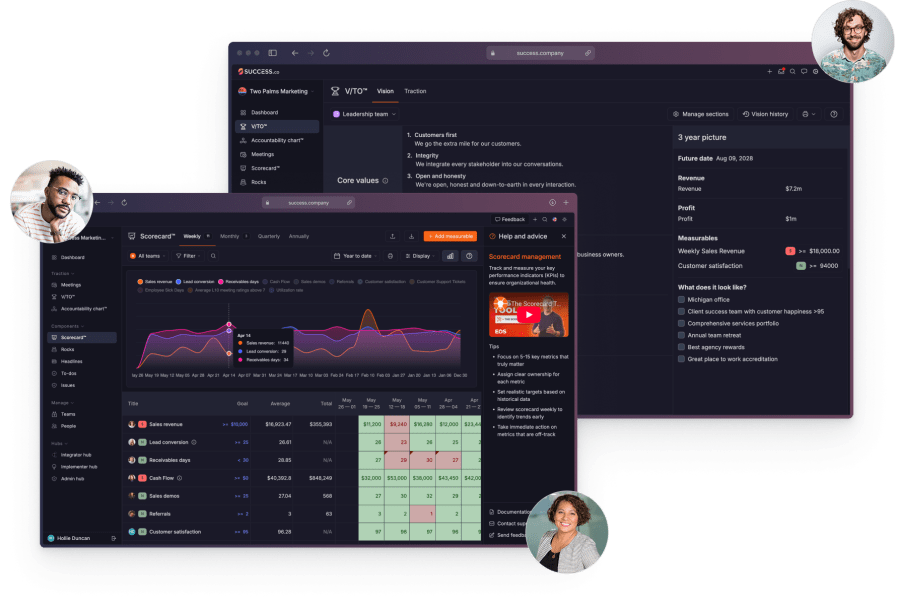
For a team that has never run EOS before, the software should make the framework easier to learn, not harder. That is the whole design brief behind Success.co, and it comes down to three things we built the platform around: EOS® Pure, blazingly fast, and deeply integrated.
EOS® Pure
We built Success.co to be EOS® Pure, an officially licensed software solution designed in collaboration with experienced EOS Implementers. Because it stays true to original EOS terminology and structure, you do not have to translate generic project management jargon into the concepts you are trying to learn.
Blazingly fast, modern and intuitive
We also built it to be blazingly fast and with an intuitive user experience. Our proprietary BlitzSync technology keeps your data synced instantly between the cloud and your device, so there are no load times and no waiting for a save to go through. You can even keep working offline, so a bad WiFi connection on-site or mid-flight will not stall your meeting. Your team will actually use the platform.
Deeply integrated
And we built it to be deeply integrated, so it fits into the tools your team already uses instead of becoming one more isolated login. Success.co connects with your Google or Microsoft calendar, Microsoft Teams and Slack, desktop and mobile apps, AI assistants, and a public API, so updating a Rock or checking a Scorecard does not mean leaving your normal workflow.
We place a strong emphasis on responsive, human support to help you through those crucial first weeks when every question feels urgent. In terms of cost, our Free Forever Plan allows your leadership team to align on your vision before you spend any money.
From there, the All-Inclusive Plan is priced per user and becomes more cost-effective as your team grows. You can also take advantage of a 30-day free trial and a money-back guarantee. If you are currently tracking your progress in a spreadsheet or another program, our team will migrate your data for you at no cost so you never have to start from scratch.
Your first two weeks: how to actually test-drive it
To find out if a platform is the right fit, it helps to follow a structured timeline rather than just logging in and clicking around. Here is a practical way to evaluate the software over a two-week period while avoiding common beginner pitfalls.
- Days 1-2 (Set the foundation): Build your V/TO and Accountability Chart using the Free Forever Plan to get your Core Values, target market, and 1-Year Plan down in writing.
- Days 3-5 (Build and run): Establish your Rocks and Scorecard, then run your first actual Level 10 Meeting. It is best to avoid using dummy data for a practice run, as a live meeting with your real Issues and active To-Dos is the only way to truly test how the software holds up under pressure.
- Days 6-7 (Watch the gaps): Pay attention to how your team interacts with the platform between meetings. Notice if people are updating their Rocks independently or if To-Dos are starting to pile up until they are forced to address them in the next meeting.
- Days 8-12 (Add one more team): Introduce one additional department to the software. It is usually best to avoid a company-wide rollout on day one, as starting with leadership and then expanding department by department allows you to refine your rhythm along the way.
- Days 13-14 (Decide): The best platform is not necessarily the one with the longest history or the biggest feature list, but rather the one your team actually adopted without needing constant reminders.
Getting started
If you are brand new to this journey, we recommend starting with our Free Forever Plan to establish your V/TO and Accountability Chart before you make any financial commitments.
When you are ready to test the full suite of tools, you can explore our demo site to click around and try it yourself, or sign up for a 30-day free trial. If you are already tracking your progress elsewhere, our team will migrate your existing data for free so you do not have to worry about manual data entry.
The framework itself is straightforward, but building the habit of using it every week is where the real work happens. Choosing a tool that minimizes friction is the best way to help your team succeed.