The easiest way to run your franchise network on EOS
Built to provide big-picture health and company-level details for franchises, multi-company groups and nonprofits with chapters or affiliates.
Track EOS® performance, drill into any organization, and share news with every leadership team from one hub.
Spot what needs attention across your entire network before it's a problem
The Organization Hub gives HQ a clear, current view of every company running on EOS. You can see who's thriving and who needs support, without waiting for quarterly reports or chasing updates.
One view of the whole network
Every company's EOS performance in one place, so you understand the full picture without logging in and out of separate accounts.
Coach ahead of the curve
A shared EOS health score shows which companies need attention this week, so you can step in early, not after the quarter is lost.
Transparency without the extra meetings
Open Issues, off-track Rocks and missed goals are visible to HQ day by day. No status emails, no extra check-in calls.
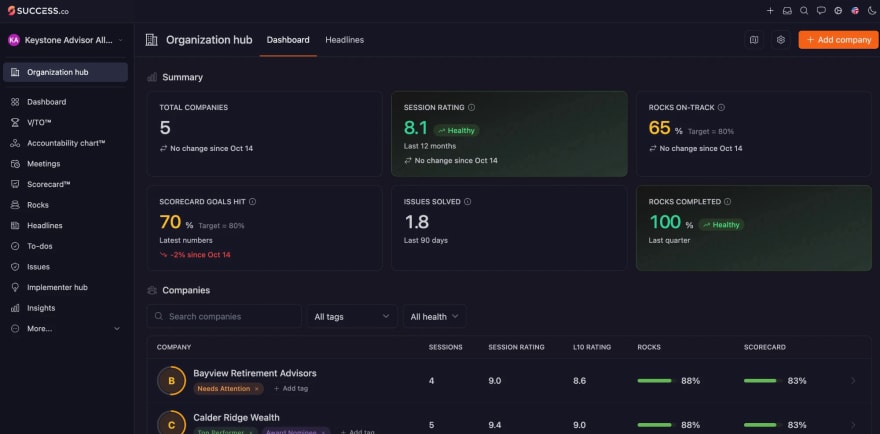
Click into any company for an up-to-date picture
Open any company to see its sessions, ratings, Rocks and Scorecard, broken down team by team. Need to go deeper? Open the company itself, with the right access, to work alongside its leadership team, just like an EOS Implementer™ would.
- Live figures for every company, broken down by team
- See active users on each team
- Recent sessions and their ratings
- Open any company directly from the hub
Build EOS mastery in every company
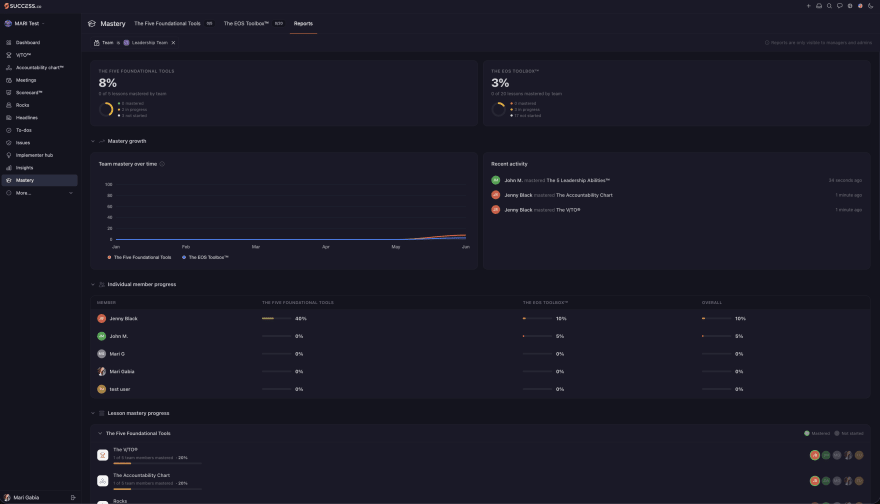
Every company in your network gets Mastery, Success.co's built-in EOS learning. Short, focused lessons take every person through the fundamentals. The content is shared with permission from EOS Worldwide, so what people learn is the real methodology. Each company's managers and admins can see their team's progress and spot who needs more coaching.
The 5 Foundational Tools
A course for every person running on EOS, not just the leadership team.
The EOS Toolbox
Advanced EOS tools and concepts for leadership teams.
Short lessons
Each one takes a few minutes.
Progress reports
Managers and admins in each company see who has mastered each lesson and who needs a nudge.
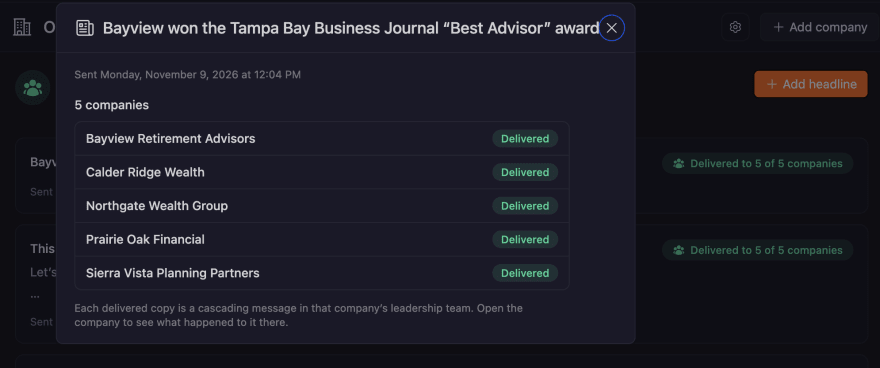
Your message, delivered and seen at every L10
Send a headline from the hub to every company's leadership team, or just the ones you choose by tag. It lands as a cascading headline in their next Level 10 Meeting™, where teams actually talk. You can see exactly which companies received it. And with V/TO™ visibility, you can read each company's Vision/Traction Organizer™ to understand where they're heading.
- Send headlines to all companies or a tagged group
- Delivered straight into each leadership team's meeting
- Delivery status for every company
- Read-only view of each company's V/TO and current Rocks
Who it's for
Franchisors
Supporting franchisees who run on EOS.
Advisor and partner networks
Coaching independent practices.
Holding companies and multi-brand groups
With several businesses on EOS.
Nonprofits
With chapters, affiliates or regional offices running on EOS.
Frequently asked questions
Who can see the Organization Hub?
Owners and Admins of the parent company. Access is checked live, so removing someone takes effect straight away.
Can child companies see each other?
No. Each company only sees its own data. Only the parent sees the rollup.
How current is the data?
The overview refreshes every night. Each company's detail page shows live figures.
Can we use our own terms?
Yes. Call your companies franchisees, advisors, locations or anything else, and the hub uses those words throughout.
See your whole network in one place
Book a call and we'll walk you through the Organization Hub.