Teamwork Integration Guide
Sync your Success.co todos with Teamwork for a seamless, two-way workflow. Our Teamwork integration keeps your tasks up to date across both platforms, automatically syncing changes made in either system.
Setup Process
Before you can start syncing, you'll need to set up the Teamwork integration:
- Enable the Teamwork integration from your company’s integration settings in Success.co

- Authenticate your Teamwork account via OAuth when prompted

- Choose a default Teamwork project and task list for synced todo's.

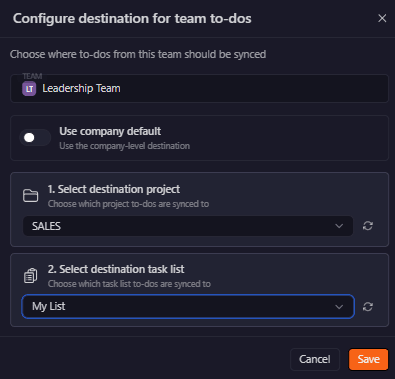
- Optionally configure team-specific destinations

Configuration Options
When setting up the Teamwork integration, you can customize how tasks sync by configuring destinations:
- Default destination: Choose a default Teamwork project and task list where todos will sync by default.

- Team-specific destinations: You can assign different Teamwork projects or task lists to specific teams in Success.co. These settings override the default destination for those teams, giving you more flexibility.
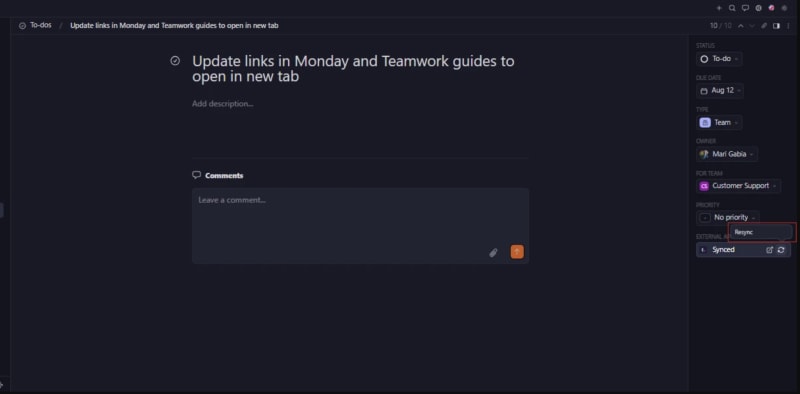
Resync Button
Users can manually trigger a sync using the "Resync" button:
Sync Behavior
What Syncs:
- Todo title → Teamwork task name
- Todo description → Teamwork task description
- Todo status → Teamwork task status (TODO, COMPLETE)
- Todo priority → Teamwork task priority (mapped: high, medium, low)
- Assigned user → Teamwork assignee (matched by email)
- Due date → Teamwork due date
What Doesn’t Sync:
- Comments or notes
- Attachments
- Custom fields
- Todo history or changelog
- Multiple assignees (Success.co only supports one assignee per todo)
Integration Notes
Team Change Limitations
If a todo is moved to a new team in Success.co after being synced, it will not automatically move to a new destination in Teamwork.
Best Practice: Set the correct team before creating the todo.
User Assignment Limitations
- Users are matched by email
- Success.co allows one assignee; Teamwork can have more
- If no match is found, the assignment is skipped
Best Practice: Ensure users exist in both systems and are properly mapped.
Getting Help:
- Contact support if sync issues persist
- Provide specific todo IDs and error messages
- Check Teamwork.com API status for external issues